配置するとき、複数のオブジェクトを選べます。
ものすごく作業が楽になります。
つまり、下の動画のように↓
使わないオブジェクトがあれば、escでスキップできます。
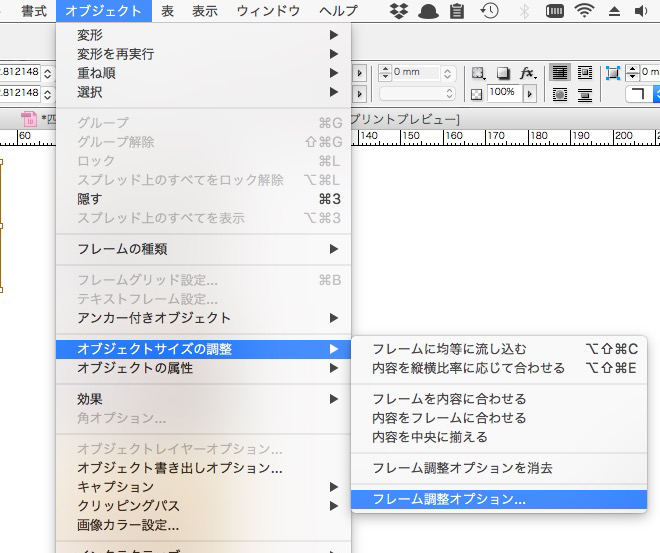
フレーム調整オプションは、
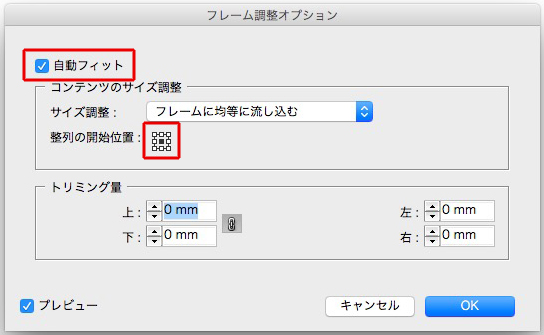
下のようにチェックを入れると、丁度よいサイズになり、天地左右中心揃えになります。
正規表現は見よう見まね
配置するとき、複数のオブジェクトを選べます。
ものすごく作業が楽になります。
つまり、下の動画のように↓
使わないオブジェクトがあれば、escでスキップできます。
フレーム調整オプションは、
下のようにチェックを入れると、丁度よいサイズになり、天地左右中心揃えになります。
Warning: Undefined array key "images" in /home/typeface/dtp.to/public_html/design44/wp-content/plugins/comment-image/plugin.php on line 29
OK!
Warning: Undefined array key "images" in /home/typeface/dtp.to/public_html/design44/wp-content/plugins/comment-image/plugin.php on line 29
OK!
Warning: Undefined array key "images" in /home/typeface/dtp.to/public_html/design44/wp-content/plugins/comment-image/plugin.php on line 29
OK!